Showing posts with label PS3. Show all posts

Friday, 27 June 2014

Clementine will remember...

Back in 2012 when I finished playing the final chapter of Telltale Game's The Walking Dead I was an emotional wreck by the end. I know I wasn't alone judging by the critical acclaim the game received and the volume of articles dedicated to Lee and Clementine's final scene together. This was one of the best story lines I've ever seen in my 30 years of gaming and it's one that still resonates. I frequently find myself mentally revisiting the game and the decisions I made while playing it well over a year later.

This week I finally bought Season 2 of the game after some significant delay in my decisison-making process. Sony's PSN deal of the week meant that the game was under £6 so it was too good a deal to pass up.

There were a couple of reasons (other than price!) why I have been holding back from buying and playing Season 2, despite having bought the 400 Days DLC. The main reason is that Telltale were keen to continue on from the decisions each player made in Season 1, and that due to a twist of fate, my final game save from that season was erased accidentally.

This meant that in order for my decisions to have any legacy in Season 2, I'd have to play the final chapter of Season 1 over again. In order for my gaming experience of distress and sorrow to be optimal, I'd need to revisit the traumatic Season 1 finale again. However, there's no guarantee that the decisions I'd make this time around would perfectly match my second play through.

This inability to guarantee the original trauma could be repeated was off-putting in some ways. Other than not really wanting to revisit around 3 hours worth of gameplay just to be able to play Season 2 (time is precious since becoming a father!), the fact that I might not make the exact same decisions that left me so emotionally bereft the first time around also stood in the way.

I needn't have let this nagging doubt paralyse me as much as it did. As I loaded up Season 2 and the game scanned for my missing save file, I was confronted with a  message that suggested that the gaps would be filled by the game rather than my decisions. This forced me to revisit the final chapter of Season 1 again - and I'm glad I did. I took this opportunity to changes some of the decisions I initially took first time around - in order to see how little or great an impact they had on the game experience. For example, my initial play through saw me take Lee's arm off in homage to Rick in the graphic novels. This time, however, I kept the arm and it allowed for a very minor modification to the gameplay. I also saved Clementine from the trauma of finishing Lee off.


Ultimately, the decision tree forces the player along the pre-scripted narrative path with only minor adjustments. Even though I know what was coming, I still felt the heart-wrenching impact of my decisions and now I'm content enough to know that my actions as Lee will have some legacy for Clementine.

And yes, I did choke back a few wet ones. Again.


Tuesday, 11 June 2013

Why did Microsoft borrow Sony's PS3 playbook for the XBox One?

Having spent a few minutes pouring through my RSS feed reader and various social networks it seems like E3 is the place where Microsoft seem to have compounded the problems they started with their awful reveal event back in May.

Back then, not only did they drive the point home that the XBone was going to be a home entertainment system but they issued some rather bizzare messages about the system's (in) ability to play used games - something which forced them into addressing with a series of follow-up announcements. Meanwhile, Sony just sat back and did, well, very little. All it had to do was not repeat what Microsoft was doing.

The overall feeling many gamers were left with was one of confusion and bewilderment, but we all expected that E3 would be the place were the real battle for the next generation of games consoles would be fought. And it seems like Sony may have won the first round.

Microsoft's new console appears to be coming in as a home entertainment system that hooks up to your cable TV box, replete with some potentially limiting Digital Rights Management (DRM) software, a camera that wants to watch you and spy on you 24/7 (except in Germany where this is illegal). It must be connected to the internet once every 24 hours even if you want to play single-player games (to check with the DRM software - you're not a thief are you?), and will not let you trade in your physical copies of video games once you've decided you never want to play them again. It's not backwards compatible either.

All this for a price of $499/€499/£429 - it looks like Europe and the UK just got shafted on the price as $499 currently exchanges at £320. £109 for import and tax differences seems steep.

No doubt Microsoft has a variable pricing strategy planned, where they will be able to partner up with companies like Sky, Virgin or BT in order to sell the machine for less than that as long as a subscription is taken out. Or at least you'd hope they have something like this planned. Judging by the awful way in which they've handled their reveals to date, you can't be sure.

This just doesn't seem to be the Microsoft I expected. I figured that the strong performance of the Xbox in the US and the UK would mean that they were going to convert a lot more Sony gamers to their cause with their new machine. I for one was expecting to be converted. However, now I'm not so sure.

Given that the Windows phone, the Windows tablet market and the Windows 8 sales have all been very disappointing, you'd have thought they'd go out all guns blazing in order to secure the next generation of gamers to their cause. But instead, they look like they are going to fight an uphill battle.

Sony's new PS4 console is likely to launch around the same time, will pack as big a tech punch as its rival (if not bigger with that GDDR5 RAM), will retail for £349, isn't region locked, will allow games to be swapped or sold, and has lots of indie developers on board. It's also not backwards compatible either, but there are indications that PS3 games will be available via their Gaikai streaming service. Oh, and its 500 GB hard drive can be swapped out and upgraded anytime. The amazing PS+ service also carries over from PS3 to PS4.


It just seems like Microsoft have borrowed from the playbook that informed the original Sony PS3 launch: announce the machine late and at a price point way in excess of its competitor, whilst focussing on it as a media centre rather than a games machine.

This time around Microsoft are going to be competing with a rival that has a very similar hardware configuration. Last time around, the PS3 was notoriously more tricky to develop games on due to its custom Cell CPU and memory management. Microsoft also had a year head start on its rival. It has no such luxury this time around.

This time, Sony has attracted the smaller PC developers to their cause, emphasising the similarity of their (slightly) more powerful machine. It's also managed to convince bigger developers that anything a PC can do, the PS4 can do - and easily from a developers standpoint.

I was planning on switching to Microsoft's platform at the start of the year. Now, I'm not so sure.

Sunday, 15 May 2011

Unexplained PSN credit card charges

When the PSN was hacked I was a little nonchalant about the whole thing, mainly because I was out the country for 2 weeks so didn't feel the impact of missing the service, and also because my bank accounts and credit card had been cancelled due to unrelated suspicious activity.  Ha!  On top of this, it was announced by Sony that the card details were supposedly protected/encrypted.

So, when there were online rumours of cards being sold on the darknets I chalked most of this up to fear, uncertainty and doubt.  I never spent much time going through my credit card charges either.  Until today.  I have one card setup for PSN purchases which gets used for nothing else, so it's pretty easy to see any unusual behaviour.  For the last couple of months, the balance has not decreased much despite over-payments so I looked at the digital receipts sent to my email account.  That was when I discovered the charges.

The charges
Thank you for your purchase with PlayStation(R)Network.
You will find a copy of your purchase details below and a link to the terms which apply to your purchase. Please print these off and keep in a safe place for future reference.
Online ID: robbo1337
Name: rob jewitt
Order Number: 218X2019X0
Date Purchased: 03/04/2011 @ 06:21 PM
Total Amount: £9.99
Item / Service Details Unit of Price
--------------------------------------------------------------------------
IP9100-NPIA09003_00-CC000000WITHFREE-EPGB Music Unlimited powered by Qriocity™ (Premium 30-day Subscription £9.99) £9.99
(Next Renewal Date: 03/05/2011 @ 06:10 PM)
--------------------------------------------------------------------------
Total Amount: £9.99
Current Wallet Amount: £0.00
This receipt clearly shows a charge of £9.99 for Sony's Qriocity music streaming service (think Spotify for Sony products).  I checked back another month and found an email dated 4/3/2011 much the same as the one above - another charge for the Qriocity service.  And it's there again on the 1/2/2011. 

Now, I've never knowingly signed up for a recurrent music streaming service.  I did install the Qriocity application when it first launched on the 2/1/2011 - I have an email saying as much.  However, I must not have noticed the terms and conditions which stipulated that they'd charge you and keep on charging you for the service.  A service I have never used past the first day.  A service that costs double that of its rivals' basic services (eg Spotfiy, Napster, We7, etc) or equal to their premium services without any of the benefit of being able to synch tracks to my iPhone or keep some audio files for good.  I'll be making use of these cancellation instructions at the earliest possible opportunity.

It turns out that it wasn't hackers who ripped me off.  No.  

It was Sony.

PSN is back up. Kinda...

In case you were sleeping (European readers!), Sony announced that they are bringing the Playstation Network back on line across a number of regions today.  This isn't expected to be the full network up and running but it is expected to be the multiplayer functionality.  If you want to check out the full blog posts then you can: click here and here.  You can also watch a video from Kazuo Hirai below explaining the situation.


You can prepare for the switch on by going over to the PS3 site and downloading the new 3.61 firmware to your computer and transferring it over to your PS3 via USB.  In my experience this process tends to be a lot faster than downloading it direct to your PS3.  Get it here.  Once you have it you need to  ensure you have a USB drive with around 200 mb of spare space that is formatted as FAT32.  Create a folder called PS3 then a subfolder called UPDATE and put the newly downloaded file in there, eg:

USB/PS3/UPDATE/PS3UPDAT.PUP

Head on over to the System Update option on the Settings field (va the XMB) and update the system via the USB storage device.  This should take about 45 seconds.  And that's it.  You can try signing in to PSN network to change your password but, currently, it appears to be still undergoing maintenance in the UK as I type.  There are instructions for how to change your PSN network password here.

The Playstation Network is undergoing maintenance

Tuesday, 25 January 2011

Digital Distribution Dilemmas


Is digital distribution coming of age or are there barriers preventing customers from embracing the advantages of cloud-based distribution? We look at the recent example of Mass Effect 2 for PS3 and questions who really stands to gain.


Mass Effect 2 posters
(Image: Derringdos, 2010, Flickr, CC)

There has been plenty of hype and excitement within the gaming press over the past few weeks regarding the release of critically lauded Mass Effect 2 for Sony Playstation 3.  This game has been out for quite some time on Xbox 360 and PC as it was released back in January 2010 and the game received high praise at the time, with Metacritic scores in the high 90% area.

I've seen several sites refer to the PS3 version of the game as either the definitive or the most complete version of the game, mainly due to the bundling of the Downloadable Content (DLC) that followed the original releases onto the PS3's Blu-ray disk. You can find a list of what DLC appears where and at what cost from this table.  Not all of the game's DLC is bundled onto the Blu-ray; that would be a missed opportunity for additional revenue.  However, what is genuinely surprising about the PS3 release is the cost of digital distribution.

Purchase options

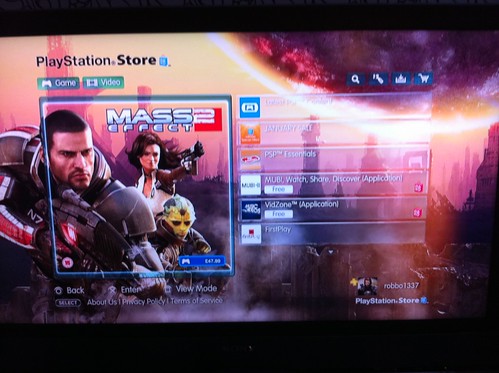
If you wanted to go out an buy the game today you'd have a number of different options.  You could walk into your local high street game store or supermarket and hand over your cash.  The advantage here is you'd be able to play the game as soon as you got home, although you may be a hostage to price if there are few competitive stores in your locality.  You could hunt the game down online using a service like Gamestracker to find the best UK price and have it delivered to your door.  The advantage here is price (£35.86 delivered via ShopTo), but the disadvantage is the delay in getting the game in your machine.  The other option involves you downloading the game direct from the Sony PSN store direct to your machine.  The game is currently retailing at £47.99 on the network and I'd guess it would take a while to download for many folk.

For the record it's worth noting that the RRP for the game is £49.99, so the PSN store comes in at £2 cheaper.


Price disconnect

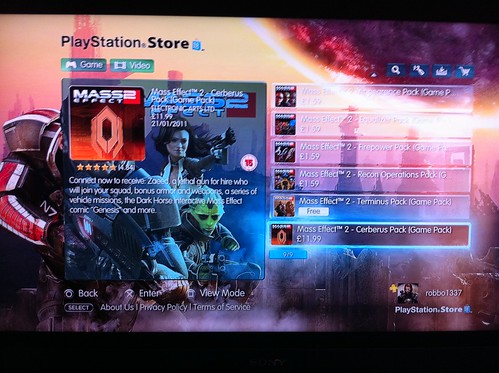
The price difference between the direct download and the ShopTo next day delivery is pretty marked at £12.13 in price.  Somehow, I can't see this direct download being a bargain purchase, especially when you could purchase much of the game's DLC with that difference as you can see from the image below:


I haven't been able to confirm this yet, but the Cerberus Pack DLC shown above comes in at £11.99.  What I'm finding a little confusing is whether this DLC is unique content or if it's the material included on the Blu-ray itself, especially as it seems to include material that reviews have hinted at as being included for free (eg the Mass Effect comic, the Zaeed character, etc).  If this is the case, the digital download strategy is one which seeks to make the most money off the PSN purchaser.


Digital Downloads

On this evidence I can't see myself ever opting to pay for the digital download format over the Blu-ray original - there's just too much doubt and not enough clarity from the PSN store regarding what you are getting for the increased price.  This has not gone unnoticed by the gaming press.  What could possibly justify the inflated price?  There's no dick, box, or manual costs. There are no transport costs bumping up the price to the consumer. OK, there may be bandwidth and storage costs incurred but it's not as if the PSN is hosting 50 copies of the game package.  Perhaps there is a licensing deal in place which prevents the PSN version from undercutting the RRP by a certain amount.  If that is the case, how is that money divided up?  We can see from the image below how that cost is divided up in the physical world.

Straight away we can exclude £6 of costs for returns as very few digital downloads will be returned. A game disk may be returned if it was damaged or faulty, thus becoming useless.  This same item will have already incurred marginal distribution costs in order for it to get to the shop shelves, and a return will need to be sent back to the publisher.  The figure of £3.50 per game per distribution seems excessive when there are no confines of physical shelf space.  I'd like to see more info on how digital distribution deals work.

For consumers, there is also no chance of selling on the digital copy if you tire of the game, and there's definitely no benefit to those interested in video game nostalgia - I can't see anyone pulling the game out after a decade and musing on the wonders of digital files.  That file certainly won't make it to eBay...

If Sony and others like them are serious about digital distribution then they really need to sweeten the deal, otherwise people will continue to flock to those environmentally unfriendly shiny disk formats.

Wednesday, 19 January 2011

Upgrading a PS3 hard drive and avoiding the problems other guides forget about: Firmware 3.55

This is an update on a post I wrote a long time ago, back in April 2009.  I figured that guide could do with a slight overhaul for those people new to upgrading their Playstation hard drives.  My guide uses an original 'fat' PS3 but the processes are largely the same for the 'slim' model.  I've added a video below for  those newer 'slim' models.

This is something I have done three times now and I thought I'd share my experiences. There are lots of other guides to doing this online and they are pretty good - it's how I managed to do it the first time - but they often omit a couple of bits of information which might pose problems if you don't quite know how to handle them.

Upgrading the PS3 hard drive brings with it a number of benefits, especially if you own a lot of games, and also if you use your Playstation as a media centre for photos, movies and music. Don't forget that you can partition the drive and install Linux on the Playstation too. My original 40gb drive was almost full after 6 months and the 80gb replacement I first installed was full within 12 months.  My 250gb upgrade lasted close to 2 years, but I can foresee a day when I'll need much more capacity, so it's time to upgrade.

This process should not invalidate the warranty.

What you will need before you start
  • New internal hard drive - this will be the drive that you are going to put in the PS3
  • External hard drive - this will be the drive that you use to backup the original hard drive (game data, saves, media files, etc)
  • USB flash drive or a blank CD - this will be used to install the Playstation firmware (currently v3.55 as I write this guide which comes in at about 179mb)
  • Phillips head screwdriver - for removing the drive
  • PS3 controller and USB cable
  • Plenty of time and patience 
[EDIT] This just in - it refers to the updated PS3 firmware (3.56), which Sony has messed up.  It applies if you have had problems updating to firmware 3.56 via the automated download service on the PS3. You should read this and act before you do anything:
Before you pull out your old hard drive, go here and download the 3.56 firmware to your computer. Copy it to a USB drive as explained on Sony's site, and update the PS3 via the USB driver on the original hard drive (still in the PS3).  (At this point, refer to Step 4 below) Once updated, pull out your old hard drive, replace with new hard drive, and update again with same USB drive 3.56 firmware. If you don't do this way, it will not work. Sony screwed up the firmware update making hard to upgrade you hard drive. This is the way I had to do it to make it work.
Sourcing a replacement drive

This is quite important but shouldn't pose too many problems. Not every drive will fit in the PS3 so make sure you check the following:
  • SATA - the drive must have a Serial ATA interface, not the older IDE or ATA formats. You should be able to pick-up a good quality 500gb+ Western Digital, Seagate or Samsung drive for around £40 from ebuyer. Larger capacity drives are a little more expensive but still affordable. I bought this 650bg drive from Dabs dues it's very fast speeds (WRITE 83M/s READ 105M/s). -this cost the same price as a 250gb drive I bought 2 years back!
  • 2.5" - the drive should be 2.5" in width, typical for laptops. If you have an old laptop drive then you could use this.
  • 9.5mm - this is the correct height for the PS3 and also is typical. However, there are some thinner and larger drives on the market so watch out. Anything with the following dimensions will be fine:  (WxDxH) 7 cm x 10 cm x 9.5 mm
  • 5400 RPM - there are drives that spin slightly faster at 7200 RPM but they are more expensive and I've seen rumours online that they may overheat for the tiny speed advantage you may get. I can't vouch for that rumour as I've never installed a 7200 RPM drive.
Step 1

Now that you have sourced a new drive and have all the material listed above, the first thing you need to do is synch your trophies (just browse to Friends on the XMB and select your profile) and backup the content on the PS3 to a removable/external USB hard drive. I've found that it helps if you the drive you are using as backup is already formatted in the FAT32 file format and that it has enough free space to take the contents of the internal PS3 drive. You can convert your drive using Disk Utility (Mac) or Disk Management (Windows), or even just create a partition on the external drive large enough to accommodate the PS3 content.

Once you are sure you have you FAT32 formatted drive ready, connect the USB hard drive to the PS3 and the system software will automatically recognize the external USB hard drive, allowing you to copy the contents.

Step 2(a)

Unlike Microsoft's Xbox 360, Sony have made it very easy for PS3 owners to upgrade their drives cheaply without having to buy official products. You can get twice the space for about half the cost. They've also included some useful software to accommodate the migration process. Your system settings and your PSN info are stored in the PS3's internal flash memory so all we need to consider are the games, games saves, photos, trailers, music, movies, etc.

You have two options here: a full backup or a partial manual backup. I'm going to lead you through the former.  It tends to take longer, but it backs up everything - which is important for most people.

On the XMB (Cross Media Bar) select System Settings, then Backup Utility. Choose the Backup option when asked and finally select your external drive. If you already have a large internal drive of, say 80gb, then this might take a while - my PS3 told me it would take 1 hour 39 minutes.  When I backed up my 250gb drive it took the PS3 just over 5 hours!  Be prepared to do this overnight if needs be.

Step 2(b)

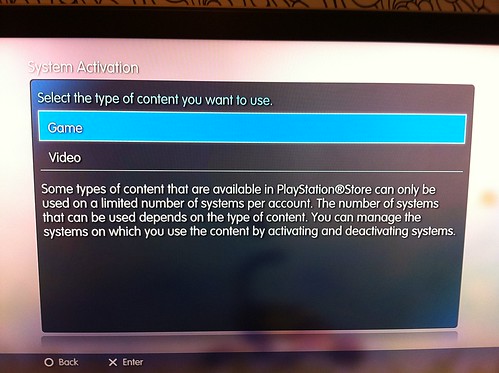
OPTIONAL: at this point it may be worth deactivating the content on your account so that you don't have any problems playing your downloaded games or files on the new hard drive.  Go to Playstation Network on the XMB, select Account Management then System Activation and then PS3 System.  You will be given an option to disable either or both of the Game and Video content you have purchased on your system.  This content is sometimes bundled with DRM that limits the amount of systems it can be played on.  I've had problems with PSN games needing reactivation in the past, so if you want to save yourself a headache and you don't plan on using your old PS3 hard drive, its worth doing this now.


Step 3

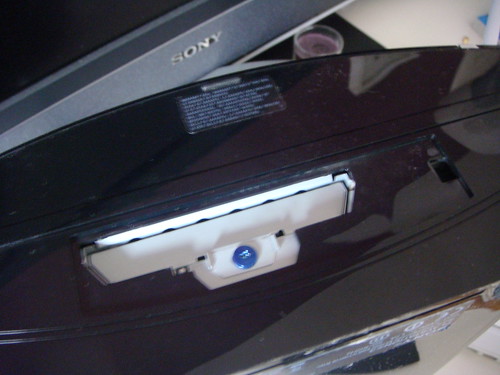
Now that the data is backed up we are going to need to open the PS3 to take the hard drive out. First of all you will need to completely power down the PS3 and disconnect all connections (HDMI, power cable, USB, etc) so that no charge remains. It is advisable to wait about 10 minutes to let the machine cool down too. Take the machine to a flat clean work surface and stand it on the side with the cooling vent (with the stand by switch) so that you can see the hard drive access panel (it should have a sticker on it). Pop this panel off with your fingernails or a screwdriver. The Playstation owners manual even contains details about this process.

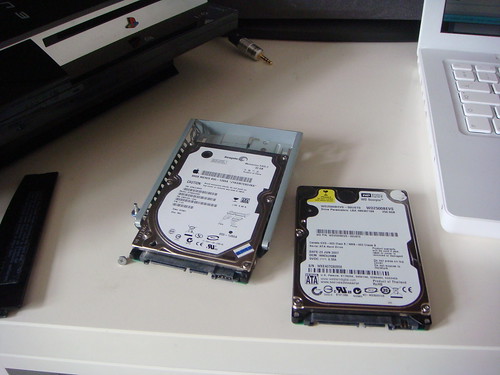
Unscrew the blue screw. Pull the metal handle and the drive tray will pop out. Now, there are four small screws keeping the hard drive in the tray. Now these are cheap and will strip if you force them with an inappropriate screwdriver so use the right tool. Sony will send you a new tray and screws if you do this but your old drive will be stuck (ideally you want to be able to get the old drive and make a portable drive out of it).

Owners of the slim Playstation model will need to remove a panel on the bottom of their machine, at the front, in order to get to their blue screw and drive caddy.  See the video below for details:


Swap the old drive for your new hard drive (label side up) and screw everything back in and plug the PS3 back in.

Step 4

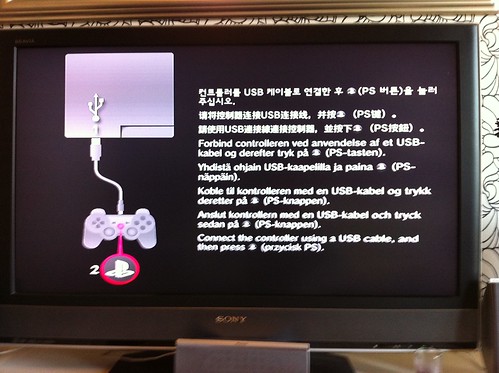
When you turn the power on you will be asked to connect a controller using a USB cable and press the PS button. At this point you will get a message saying the following:
The system software cannot be run correctly. Press the PS button to try to restart the system.

If the system cannot be restarted, the system partition of the hard disk must be reformatted and you must reinstall the system software.
Connect storage media that contains update date of version 3.55 or later, and then press the START and SELECT buttons as the same time.
For information on how to obtain update data, refer to the SCE Web site for your region.
NOTE: Most sites offering upgrade advise skip this section, hence my post so pay heed to the following section

If you do press the PS button you will end up in a feedback look unless you connect a USB drive with the v3.55 firmware to the PS3 (refer to the updated EDIT note at the top of this guide). You can't just copy the file over to the USB drive by dragging that file to your drive. That would be too easy. No, you must create a folder on the USB stick called PS3 and then another folder in that called UPDATE and place the firmware file in there in order for the PS3 to read it.

USB/PS3/UPDATE

Do this now and press START and SELECT.

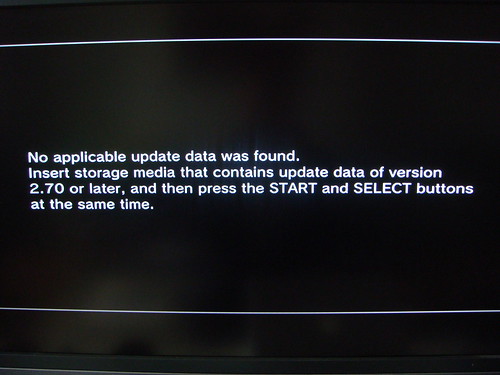
If you don't create the USB directory exactly like that, you will get the following message:
No applicable update data was found.
Insert storage media that contains update data of version 2.70 or later, and then press the START and SELECT buttons at the same time.
Note: the photo above is quite old now, but you should get something similar referring to firmware 3.55.   Now that you've done that, and followed the onscreen instructions (photo below) to format the new drive (we want to do this - it'll take 2-3 mins) we can start the next long part of the process.


Step 5

Most likely your PS3 asked you to agree to installing the new firmware, and then it automatically restarted itself when you agreed to the terms and conditions. You will likely be asked to hit the PS button  on the controller once again:


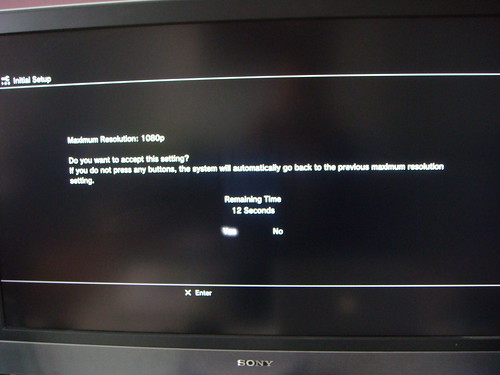
Select your language of choice. If you have an HDMI connection the PS3 will detect it automatically and ask you to switch to the optimal settings - agree to this.

Select a time zone; set the date and time; add your preferred user name before entering the Internet Connection Settings. Work your way through the configuration screens. None of these inputs really matter as you are going to restore your data from the backup we made earlier (including all your settings).

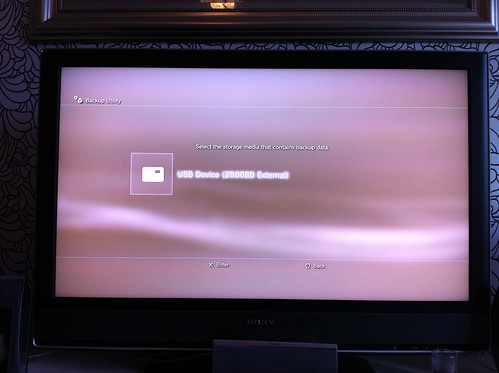
Eventually you will be able to get to the XMB. Plug-in your external drive with the back-up data, then head over to System Settings, then Backup Utility. Choose Restore when asked and finally select the device you backed everything up to:


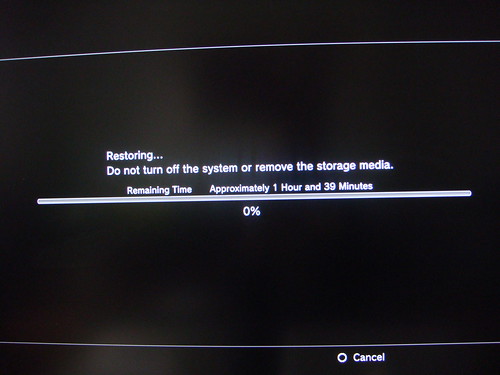
This is the second major time killer moment as the data gets restored. Restoring my 80gb drive worth of data took 1 hour 39 minutes.


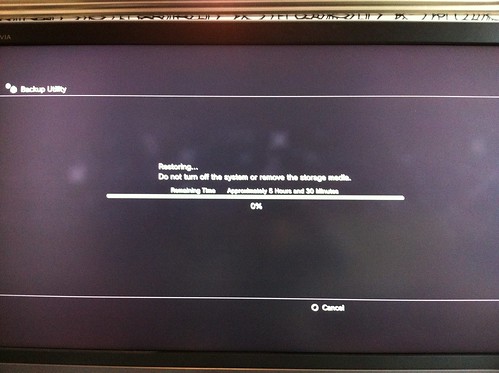
Restoring my 250gb drive to the replacement 650gb drive took 5 hours 30 mins!  Don't say I didn't warn you.


Step 6

After all that, your PS3 should be ready for business. You can even go on to install Linux if you want but I'm not going to cover that in this post. I might do that later, but it requires another reformat and a bit of time. If you want to do this then make sure you backup your new install first or keep that drive you copied somewhere safe. Sony removed this functionality around the time they introduced the slim PS3 model. The only way this can happen now is if you hack your PS3 but Sony aren't very happy about this and may respond punitively in future.

In some cases you may have to reactivate your downloaded PSN games and video as I mentioned in Step 2b.  If your PSN games are not working, you will get a system message telling you to reactivate them.  Head over to Playstation Network on the XMB, select Account Management then System Activation and then PS3 System.  In some instances I've had this message even though the system says my games are activated.  Simply deactivating them and then reactivating them fixed the issue for me.

Now you should have a spare internal hard drive left over.  You could even use the old drive as a backup resource. However, you will need to ensure all game saves or new data are copied manually.

All should be well. Most guides advise you to keep your old drive somewhere safe in case you have any problems in the future. You can do that but if you are out of the warranty you could always buy a hard drive caddy and turn your old drive into a portable drive. Caddies are cheap at about the £6 mark from most computer shops.

The original 40gb drive I took out of my PS3 was a Seagate drive and it stated on the sticker that you shouldn't put the drive in another laptop. It doesn't say anything about caddies...

Let me know if you have any trouble following the guide.

One last thing...

One thing that might strike you when you complete your upgrade is that you won't ever get the total hard drive capacity offered on the label.  I found this post over on eBuyer which might help explain why a chunk of your capacity is missing:
I bought this drive for my sons PS3 going from a 60Gb drive up to 500Gb.
 With his 60Gb drive he had used around 40Gb so after I had backed it up and restored it on to the 500Gb drive, I was expecting around 420Gb free however the PS3 reported 373 / 465Gb.
I know all about the way drives are worked out with the capacity so was expecting from the 500Gb drive:

  • 465Gb available space
  • 
40Gb from the previous back up
  • 
425Gb free
However the PS3 was saying I now had:
  • 465Gb after formatting

  • 373Gb left after restoring from previous back up
So in effect it was now using 92Gb from my previous back up yet my previous drive was only 60Gb!!!

I couldn't get my head around it at all and formatted it again and reloaded but it was exactly the same.
So I searched the net and have found that out of a 500Gb drive, 465Gb is available (which is correct and would be the same on Windows) but the PS3 also makes a % available for its operating system and other things which on a 500Gb drive is around 52Gb
I found this reply from a user who contacted Sony direct asking about the issue: 
"The percentage of space that is allocated for system administration varies from model to model and is between 16% and 20% of the hard drive space. This space is reserved for system administration functions and for future updates or developments. This space is not reserved for "Other OS" functions."

Most folk are reporting 413Gb/465Gb from their PS3 after doing a clean install with a 500Gb drive.

 I hope this helps others who were wondering where the extra Gb was going.

Friday, 8 October 2010

Tracking Playstation Plus: August and September

I kind of forgot to review the Playstation Plus proposition for August so I figured I'd bundle that month in with September. It's been a while... since I last updated this series of posts but in the last one I covered the content on offer for August.

Below you should be able to see a little table charting the content I grabbed and an overview of the estimated value for that month...


Back in September Sony released the following content for Plus subscribers:
  • PSN: Sam and Max: Devil’s Playground (entire season)
  • minis: Vector Tower Defense, Echoes
  • PSOne Classic: Abe's Odysee
  • Full Game Trial: Warhawk (Plus exclusive 50% discount for Plus members on purchase), Inferno Pool
  • Exclusive Discounts: LittleBigPlanet Ico and Shadow of Colossus costume pack - 50%; Metal Gear Solid (PSOne) – 50%; Warhawk – 50%; Pixel Junk Shooter – 20%
  • DLC Exclusive: UFC Undisputed 2010
  • Dynamic Themes: Exclusive PlayStation Move theme; Exclusive ‘Fish Tank’ theme
  • Premium avatars: Eye Pet Blue Goalie Avatar; Eye Pet DJ Avatar

On top of that there were a few additional add-ons.  New subscribers to the annual package were given the full game (digital download) of Ratchet and Clank: Quest for Booty to keep permanently.  Early access to the following demos were also given: God of War: Ghost of Sparta (PSP),
 PES 2011 and Castlevania: Lords of Shadow.  If that wasn't enough on the 27th of September Plus subscribers were also given exclusive beta access to the multiplayer version of Assassin's Creed: Brotherhood - this was something worth having! Oh, and an exclusive Infamous 2 theme, although that wasn't much to shout about.  Below is the table of content I downloaded:


The total monthly savings for August (£20.34) and September (£29.45) had I paid for this would be £49.79.  If we include the £14.77 from the month of July then the running total quarter way through the year stands at £64.56.

It's very difficult to measure how much the exclusive content costs, especially as the beta for Assassin's Creed has been rumoured to go on a more general release for non-subscribers at a later date, but it certainly did sweeten the deal.  It's also not the last beta to be announced - read on.

October's content


The following material has been announced by Sony for October:
  • PSN: Street Fighter 2 HD Remix
  • minis: Aero Racer, Yeti Sports
  • PSOne Classic: Syphon Filter
  • Full Game Trial: Ferrari The Race Experience; Tomb Raider Underworld
  • Exclusive Discounts: Burn Zombie Burn  - 50% discount (inc. free exclusive Home item for Plus members who buy); Trine – 50% discount; Alien Breed: Impact – 20% discount; Gravity Crash – 50% discount; Ace Armstrong Vs. The Alien Scumbags – 20% – day 1 discount; Shatter soundtrack and Dynamic Theme – 50% discount
  • DLC Exclusive: n/a
  • Dynamic Themes: Exclusive Move ‘Start the Party’ theme; Exclusive ‘Halloween’ theme
  • Premium avatars: Pain: Jarvis and Le Toot Avatars (2); SingStar: Wannabe and Rising Star Avatars (2)
October did look a little underwhelming in terms of content (with the exception of the acclaimed Trine at half price) until the announcement that Killzone 3 would be an exclusive beta for the first 10,000 Plus subscribers who sign up on October 13th.  This is a real draw as Killzone 2 is one of the best FPS games on the system.  Also, any new annual subscribers get an extra 3 months of Plus for no extra cost. IS ta enough to make you buy?

Thursday, 5 August 2010

Tracking Playstation Plus: July

A new month means a review of the past month's PlayStation Plus purchases as outlined in this post, and a speculative glance to the coming months.  In case you aren't aware of what this series of posts is inspired by then I shall endeavour to summarise... IGN asked the question "Is Playstation Plus a good deal?" and asked for PlayStation users to join in, hence these posts.  So, do subscribers to the £39.99/$49.99/€49.99 service get good value for money?

Well, that's a trick question to answer, especially given that US subscribers get more content per month than European subscribers - clearly visible in the IGN charts in which the editors list games and DLC that are not available to Europeans.  It would seem that the US 'Plus' store was updated each week or two.    Nevertheless, I shall offer a personalised account of my 'Plus' experience and attempt to offer some objective analysis of the value of the service.  Firstly, let's review the first month:

Month 1 (June 2010)

I've already covered what the service entails in the first post but I thought it worthwhile to list all the options that were available to UK subscribers in the first month (as long as I can recall them!)
  • Intro offer: LittleBigPlanet (standard edition)
  • PSN PS3: Wipeout HD
  • minis: Field Runners, Age of Zombies
  • PSone: Destruction Derby
  • Full Game Trial: Shatter, Savage Moon
  • Discounts: LBP God of War Pack – 50%, LBP: LocoRoco costume pack – 50%, Gravity Crash – 20%, Fat Princess DLC – 20%
  • Premium Game Element: KillZone 2:  Steel & Titanium DLC
  • Push demo: ModNation Racers, Heavy Rain
  • Themes: LBP Theme, SCEE produced: PlayStation “Game Is Just The Start” Dynamic Theme
  • Premium Avatars: 2 x Fat Princess
  • 24 hour early preview: Kane & Lynch 2: Dog Days

It's worth noting that LittleBigPlanet was only available to the annual subscribers and not the 3 months package subscribers.  It's also the only game content that can be kept by people if they let their subscription lapse (excluding themes and avatars).  After the break you'll find a table of material I downloaded and purchased by means of the 'Plus' service.


In the launch material Sony made much of the claim that over £200 worth of content would be given away throughout the year.  Looking at the content I consumed, that claim looks like it will hold true.  I downloaded content to the value of £36.73 in the first month alone and that figure excludes LittleBigPlanet which is now listed in the PlayStation Store as £16.99 (despite it being a bit cheaper in its physical format from stores like Shopto or Play - surely digital content should be cheaper?).  A true total figure would come in at £53.72 if we include that content.

However, there are a few caveats I need to point out.  I already owned both LittleBigPlanet and Wipeout HD, as well as the 'premium' DLC for Killzone 2.  Frankly, I'd imagine many PS3 owners will already have these games given their critical acclaim and decent sales figures since they were launched (in fact I gave away my physical version of LittleBigPlanet to a pal).  Therefore I've added an extra field to the table called 'Saving' which shows how much the downloads would have cost had I purchased them in the traditional way.  This figure is more modest at £14.77.

There's another issue here too.  Of the content that I did download, I can safely say that it was unlikely that I would have ever purchased it had it not been included in the subscription package.  I had no interest in the Minis titles or the PSOne Classic game.  That's £11.97 worth of content that would never have been paid for.  I might have purchased the theme or the avatar so the true value for money on offer looks a little dubious.  I would have taken advantage of the Wipeout HD offer had I not already purchased it so that balances out.  A more sceptical take on the value of the content I may have paid for comes to £2.90

One negative consequence of the new service is that subscribers might be a little less eager to buy PSN games, preferring to wait and see what the Plus package will offer - a point made on the official Sony blog by user GothPunk.  I have certainly held back from buying games since the inception of Plus for this reason.  I'm also a sucker for discount/sale offers, as outlined (.pdf) by the behavioural economist Dan Ariely, and like to feel like I've got a bargain.  Consumer behaviour can be difficult to predict but there are tried and tested means for incentivising customers to purchase.  I fell for the discounted DLC offer on Fat Princess - a game I haven't played for about a year - but I'm no longer willing to buy full games, just in case they appear as part of the 'Plus' package.

Looking forwards

Yesterday Sony announced what content will make up the next two months of Playstation Plus

August:
  • PSN: Zen Pinball
  • minis: Blast-Off, Alien Zombie Death
  • PSOne Classic: Medievil
  • Full Game Trial: Infamous, Mushroom Wars
  • Exclusive Discounts: Zen Pinball Earth Defense Table – 20%, Warhawk Triple Combo Pack – 50%, GT Club PS3/PSN – 50%, WipeOut HD Fury – 20%
  • DLC: MotorStorm Pacific Rift: Adrenaline Pack
  • Automatic download demo: Pixel Junk Shooter, Mafia 2
  • Dynamic themes: Exclusive PlayStation Plus Theme, Exclusive ‘Clock’ Theme
  • Premium avatars: Heavy Rain characters x 2
September
  • PSN: Sam and Max: Devil’s Playground (entire season)
  • minis: Vector Tower Defense, Echoes
  • PSOne Classic: Oddworld: Abe’s Oddysee
  • Full Game Trial: Warhawk (with exclusive 50% discount for Plus members on purchase), Inferno Pool
  • Exclusive Discounts: LBP: Ico and Shadow of Colossus costume pack – 50%
  • Metal Gear Solid (PSOne) – 50%, Warhawk – 20%,  Pixel Junk Shooter – 20%, 
  • DLC: Exclusive UFC Undisputed 2010 DLC
  • Dynamic themes: Exclusive PlayStation Move theme, Exclusive ‘Fish Tank’ theme
  • Premium avatars: Eye Pet Blue Goalie Avatar, Eye Pet DJ Avatar

This could be a shrewd move by Sony - by announcing what games/DLC are comng soon subscribers can decide whether or not to purchase the relavant titles.  For instance, will people hunt out cheap retail versions of MotorStorm Pacific Rift and UFC Undisputed 2010 knowing that they will be able to score on the free DLC?

Sony have also promised extra exclusive content will appear throughout the months. As for whether or not the announcements will act in Sony's favour or against them remains to be seen.  I'll report on August's value for money in the first week of September.

Thursday, 8 July 2010

Is PlayStation Plus A Good Deal?

Over at IGN the Playstation team have been asking the very question: is the newly launched Playstation Plus service a good deal for users or is it a waste of cash?  For those who aren't quite au fait with what this service is or what it means, you can check out the Sony press release for full details, but I'll offer a brief summary of the main features below.

What is it?

Since it's launch  in November 2006 the Playstation 3 has had a free online network (entitled PSN) on which Playstation owners could speak to or message each other, play games with friends, browse the web and purchase content in the online store.  Everyone with an internet connection could use it free of charge - just as well, because the service could be pretty glitchy in the early days.  Microsoft have a similar service for their Xbox 360 called Live, except theirs came in two tiers: a Silver (free) and a Gold  variety (annual charge of £39.99).  The basic package allowed for some communication between members and the purchasing of downloadable content.  If you wanted extra features such as playing online games you had to pay the annual fee.  This had some advantages - namely Microsoft could invest that subscription fee into paying for servers to host content - something Sony struggled with at first.


Last week Sony announced Playstation Plus: their fee-based subscription service for the PS3 which retails at £39.99.  Unlike Microsoft, they still provide all of the online services that the PSN launched with.  Sony see Playstation Plus as a service that adds extra value to gamers by virtue of offering the following:

  • Discount on games and/or downloadable content
  • 4 free Playstation games per month (this includes old Playstation 1, Minis, and standard PSN titles)
  • Premium avatars and themes
  • Full game trials (a try-and-buy scheme using a full game rather than a limited demo)
  • Early access to demos and beta versions of games
  • Automatic content downloads and updates


In total Sony claim that Playstation Plus will offer subscribers content to the value of at least £200 per year.  There is a drawback though fail to renew your subscription and you lose all the 'free' gaming content you downloaded.  However, in order to offset that setback subscribers were given the excellent LittleBigPlanet game to keep even if they don't renew their subscription.  I already owned this game so it saves me nothing but some gamers may not have it.  You get to keep the avatars and themes but these are small value items.  So, the question remains, is £39.99 a good deal given that most Playstation gamers got by just fine on the PSN without spending a penny?  In order to work out if this is good value for money I'm going to join the staff at IGN in monitoring my use of the service.

Another tracking project...

In case you didn't guess, I subscribed to the service on launch day (June 29th) in order to see what the fuss was all about.  This give me the perfect excuse to emabark on another year long tracking project so it alongside my musical expenditure project.  I'm going to follow the strict rules set out by IGN:
For the next year, IGN PlayStation Executive Editor Greg Miller and IGN Guides Guru Colin Moriarty will track their PlayStation Plus PlayStation Network purchases every Wednesday. If they buy a full price game, it won't be logged here. On the chalkboards below, we'll track what the "free" content would have cost them as well as the discounts they're receiving. Now, these figures will only include new stuff that the boys have downloaded. If they already own a piece of content, it won't be included just because it has been discounted or marked as free. This is strictly what they've downloaded under the PlayStation Plus umbrella to date. 
The IGN staff are only counting the cash saved via the discount scheme, but I will add an extra field to include the value of the digital items that are kept after the subscription lapses (ie the avatars and themes).    Also, one of the PSN games that is 'free' this month is Wipeout HD - a game I already own so there is no real benefit to me this month.

If you want to see how much 'value' the Playstation Plus service is to a regular gamer check back here in a few weeks.

Wednesday, 9 September 2009

An interesting week for misleading statistics

A few technology news headlines have attracted my attention this week that seem to be somewhat less than honest. Some of the ones that stood out included the 10% surge in BBC iPlayer traffic following its inclusion on the new PS3 Slim which in turn has been reported as bringing about a massive sales spike in Sony PS3 units following the slimmer redesign. The other noteworthy report involved the claim that 7 million of the 61 million UK residents is engaged in illegal file-sharing activity. Let's take a little look at those claims...

Sony's sales and why they might not be so impressive

There have been several reports that Sony is having a very successful PS3 Slim rollout. Popular games blog, Kotaku, noted that the redesigned PS3 sold more units in Japan in the first three days following the relaunch (150,252) than it did back in November 2006 when it was originally released. It sold 88,000 units in two days but there were issues with supply levels at launch, so not everyone who wanted one could get their hand on one.

The more interesting PS3 story came from VG247 courtesy of Chart-Track director, Dorian Bloch, who claimed that UK-based PS3 sales in financial week 36 were up over 999% on the week prior. This is a story which has snowballed and appeared in several other places. Great news for Sony. Or is it?

On the surface the 999% or 1000% sales boost seems impressive but this has to be seen in the harsh reality that very few people were likely to be buying the older PS3 model when the new slimmer model was about to be launched at a reduced price. It's not hard to see why a huge sales spike may occur when very few units were being sold in the week prior - but it makes for great headlines!

What is also unclear is exactly how many of these purchases were by new customers. Many existing PS3 owners have expressed an interest in trading their older machines in for the new model (the local GAME store where I live was accepting a trade-in deal of one 80gb PS3 plus two games and £60 cash for a new slimmer PS3).

This might not be so great for Sony after all. Sony are still producing the PS3 slim at a loss and require customers to purchase software in order to offset these losses. If they are selling lots of new units to existing customers who already own plenty software then they are unlikely to profit dramatically from these impressive sales figures. Also, Sony get no financial gain from the second hand hardware or software market. The more new customers the PS3 redesign attracts, the healthier Sony's bank balance.

It's understandable that Sony would want to view its new product launch as a success, given that the PS3 languishes in third place in the console hardware sales. It's also no surprise that Sony has announced a massive ad campaign to push its new hardware in the Christmas run in (with a campaign budget of £82 million!). Whether or not the PS3 proves to be the success that Sony needs it to be remains to be seen, especially since it experienced its first full year loss in fourteen years.

How many filesharers?

The other attention-grabbing (and more worrying) story that warrants a little exploration involves the claim that 7 million UK residents are file sharing criminals. This figure is one which has been around for some time now. The BBC ran a report back in May which cited the figure in a government-backed report. The report was issued by the Strategic Advisory Board for Intellectual Property (SABIP) and can be found on their site (.pdf here). Intellectual Property Minister David Lammy said the report put into context the impact illegal downloads had on copyright industries and the UK economy as a whole.

This figure of 7 million criminals is quite catching, seems precise and scientific and has helped perpetuate the notion of digital criminality amongst UK web users. It was also calculated that these file-sharers had access to £12 billion worth of free content. It has also helped keep file-sharing and its supposed criminality in the media spotlight in recent weeks - something Lord Mandelson has been using to great effect in his attempt to lobby for hard-hitting punitive measures against file-sharers.

Credit needs to be given to the BBC who took a second look at that figure of 7 million and decided to see if they could locate its origin, following an enquiry from the audience of the BBC Radio 4 show, "More or Less".

The figure may have been reported in a government document, but it's not a government figure. It transpired that the government commissioned a report from the CIBER research group at University College London, which contained the number. The CIBER report mentioned the figure four times. However, the figure actually came from yet another report from consultancy firm, Forrester. It doesn't end there. The Forrester report doesn't actually contain the 7 million figure despite the CIBER citation. The figure actually comes from a different piece of research called the Jupiter Industry Losses Project, which was an industry funded (BPI) attempt to gauge P2P use and the related losses produced by such internet use.

That's right. The official sounding figure cited by the government-backed report actually came from the British recording industry which has a vested interest in putting a figure on its losses at the hands of P2P users so that it can then lobby government to change policies and laws favourable to the industries interests. That explains why Lord Mandleson has been so anti-P2P in recent weeks...

It gets worse. The actual report was never published publicly and the industry declined to pass it over to the BBC but they managed to get in touch with Mark Mulligan, one of the report's authors, who revealed some interesting methodological assumptions. The report estimates that there are 6.7 million illegal file-sharers in the UK. It arrived at this figure when multiplying the total number of Internet users in the UK (estimated at 40 million by the report despite the UK government putting the figure at 33.9 million) against the percentage of the population engaged in file-sharing.

As for the estimate of the piracy percentage, that comes from a 2008 survey of 1,176 UK households. The survey actually found that 11.6 % of respondents admitted to using file-sharing software, but this figure was inflated to 16.3 % to account for "under-reporting". It's not quite clear how this figure was arrived at but it was based on the assumption that some respondents would lie about their P2P use, and Mulligan claims to it be 'based on evidence'.

The differences between these figures are staggering and produce vastly different results. If the lower figures are used instead it transpires that only 3.93 million UK residents are criminals, not 7 million.

And finally...

What does this all mean? Can we actually trust the figures used by goverenemtn and industry alike? As Nate Anderson (over at Ars Technica) puts it:
"The problem isn't that such calculations are done; they can serve as useful tools for industries and even for policymakers. But problems develop when the numbers are ripped from their original, provisional context by repetition and citation, eventually taking on the force of Fact. When such "facts" end up being used to make policy, the problems are compounded."
Statistics and facts are not always what they seem. Ben Goldacre, author of Bad Science and regular Guardian writer, puts it slightly differently:
"As far as I’m concerned, everything from this industry is false, until proven otherwise”
I'm inclined to agree, but there is a worrying point to these examples of misreported statistics and over-inflated figures. If they go unchecked, they become powerful rhetorical strategies that can gain momentum and if repeated enough times in the right places can take on the appearance of 'truth' from which it is only 'common sense' to act accordingly. I wonder how successful the new PS3 actually is and are shareholders seeing the benefit of increased sales? Does this equate to more inward investment in the technology at both the software and hardware levels, and does this bring benefits to the end user? Can we really believe the figures bandied around by the recording industry and what are the consequences if they are not contested? Who benefits from being disconnected from the internet on the back of wild exaggerations?

Wednesday, 20 May 2009

Format exclusive DLC flip-flops

It seems like good fiscal sense has finally won out in the battle of format exclusive DLC, well, at least in relation to Bethesda's Fallout 3. C&VG are carrying a news story stating that the once Xbox/PC exclusive content is finally going to make it's way to the PS3. At long last, I will be able to spend my £30 on buying extensions to one of my favourite games of the last 12 months. The Bethesda post is here.

I got a little angry last month when the third batch of DLC was announced, Broken Steel, for Microsoft friendly environments. Hopefully, Bethesda will learn from their mistakes and ensure that when they release the new material for the PS3 that it will be functional and not broken again. One can only hope. If they do, I will even forgive them for messing with the chronology of the gaming narrative as outlined by Michael Abbott on the Brainy Gamer site.

A minor point of umbrage is that future DLC will still be staggered behind the Microsoft release, but what the heck. I'm pacified for now. I hope they updated the radio station with more classics from the wasteland...

Tuesday, 21 April 2009

On the problems of format exclusive DLC...

We might want to file this one under 'rant'...

It's not often that I stop to think about the ways in which games companies shoot themselves in the foot but today I had one of those moments. I had been reading through the recent press releases for Bethesda's Fallout 3 downloadable content (DLC), entitled Broken Steel. This is the third release to date which extends the world of Fallout 3, following Operation Anchorage and The Pitt.

Unlike the previous two releases, Broken Steel, promises to take place where the original game left off. The other games were set in the same post-apocalyptic game world as Fallout 3 but they deviated from the original title somewhat. Broken Steel allows you to increase your character's skill level to 30, beyond the original 20, and also brings with it other various perks. That is, if you have any version of the game that isn't PS3.

Having games be exclusive to a particular system is not a new thing. In fact, it was a big part of Sony's success with the original Playstation and its successor, and may have even been pivotal in platform purchase decisions. That can make a lot of sense in terms of a large scale marketing campaign focusing on brand exclusivity, but I'm not convinced the same thing can be said of smaller DLC.

The problem...

This is where my problem begins. The press release material all sounded pretty attractive to me - I am more than happy to buy additional content for those games I have enjoyed playing, especially if they promise to extend the pleasure of that experience or offer added value. However, I own a PS3 and a Mac, not an Xbox 360 or a PC where the DLC is going to be headed.

None of the DLC has been available to date for the PS3. The reasons for this? Unknown, although rumours of a deal between Microsoft and Bethesda are littered across various gaming sites. IGN reported back in July 2008 that Bethesda's Todd Howard promised "extensive" DLC for Xbox and Games For Windows. No official announcement was made at the time as to why the PS3 was excluded. Edge carried a story around the same time in which Colin Sebastain of Lazard Capital Markets remarked thus:
"...I think it's a very good possibility that Microsoft and Bethesda were partners in this decision. Obviously Microsoft paid up to secure exclusive online content for GTA IV, and online is a cornerstone for Microsoft's digital media strategy."
In the same article, Bethesda's marketing boss Peter Hines is quoted as saying:
"...We aren’t going to get into the details of the hows and whys," said Bethesda marketing boss Pete Hines in an e-mail. "[DLC] will be exclusive for PC and 360. [We're] not going to give any other qualifiers or clarifications as it relates to other platforms."
Incentive to buy?

As you can see, Fallout 3 is by no means an exception. Microsoft signed an exclusive deal with Rockstar so they get the GTA IV DLC on their platform. Now, I have to ask, who really benefits from this kind of exclusivity deal? Do Microsoft really gain that much by securing the rights to exclusive DLC content? Do the game developers gain from the cash tie-in which denies one platform? I enjoyed both GTA IV and Fallout 3 and would gladly buy the DLC if it were available. However, one platform having exclusive DLC whilst another does not is not enough to make me buy that machine over the other.

The only solution it would seem, is to buy an Xbox 360, then buy the games I already own, then buy the DLC. As you can imagine that is not something most consumers in the middle of a global recession are likely to do just to play an extra few hours worth of content. A quick estimate of exactly how much this would cost from Amazon goes to show you the potential implications:
I had to include Wireless Network Adapter as I'd be unable to connect my machine to my wi-fi router any other way, and I had to include an Xbox 360 which has a hard drive to download content onto. I excluded the cost of the DLC as that would be paid for on either format for the sake of this example. I also excluded the cost of Xbox Live Gold subscription which wasn't needed to get the DLC. The free Silver package is fine.

Almost £240 to play the DLC is beyond reasonable. Not everyone can afford to buy two machines. Not everyone can have the foresight to know which companies are going to get which exclusives, or which games are going to be so enjoyable you will want to buy more expansion packs. Not everyone who buys a games console is aware of the past deals signed between developers and manufacturers.

I make these points to highlight the shortfalls of DLC exclusives. DLC will seldom be a major purchasing factor when people decide which of the largely similar consoles they will opt to spend their money on. It may play a role, but not the deciding role. Therefore, I ask who actually wins and who loses as a result of these exclusive deals?

And the winners are...

I can only guess that the developers win in the short term by virtue of receiving a cheque from Microsoft. Microsoft may stand to win a small PR battle over Sony, but there are other areas in which they may lose out (Blu-ray functionality; cheap expandable storage; etc). The real losers here are the gamers who can't access the content they would gladly buy because of a format battle (one which is actually good for games in that it fosters competition and technological advancement).

Each of the Fallout DLC costs about £10 (or 800 Microsoft Gamer Points). That's £30 that Bethesda will not be getting from me or from the other angry PS3 owners who would have made excellent customers. Who's winning now?

Thursday, 16 April 2009

Upgrading a PS3 hard drive and avoiding the problems other guides forget about

#NB: an updated version of this guide covering firmware 3.55 can be found here

This is something I have done twice now and I thought I'd share my experiences. There are lots of other guides to doing this online and they are pretty good - it's how I managed to do it the first time - but they often omit a couple of bits of information which might pose problems if you don't quite know how to handle them.

Upgrading the PS3 hard drive brings with it a number of benefits, especially if you own a lot of games, and also if you use your Playstation as a media centre for photos, movies and music. Don't forget that you can partition the drive and install Linux on the Playstation too. My original 40gb drive was almost full after 6 months and the 80gb replacement I first installed was full within 12 months.

This process should not invalidate the warranty.

What you will need
  • New internal hard drive - this will be the drive that you are going to put in the PS3
  • External hard drive - this will be the drive that you use to backup the original hard drive (game data, saves, media files, etc)
  • USB flash drive - this will be used to install the Playstation firmware (currently v2.70 as I write this guide which comes in at 142.5mb)
  • Phillips head screwdriver - for removing the drive
  • PS3 controller and USB cable
Sourcing a replacement drive

This is quite important but shouldn't pose too many problems. Not every drive will fit in the PS3 so make sure you check the following:
  • SATA - the drive must have a Serial ATA interface, not the older IDE or ATA formats. You should be able to pick-up a good quality 250gb Western Digital or Seagate drive for around £45 from ebuyer. Larger capacity drives are a little more expensive but still affordable.
  • 2.5" - the drive should be 2.5" in width, typical for laptops. If you have an old laptop drive then you could use this (I pulled a 250gb drive out of my Macbook to dump in the PS3)
  • 9.5mm - this is the correct height for the PS3 and also is typical. However, there are some thinner and larger drives on the market so watch out.
  • 5400 RPM - there are drives that spin slightly faster at 7200 RPM but they are more expensive and I've seen rumours online that they may overheat for the tiny speed advantage you may get. I can't vouch for that rumour as I've never installed a 7200 RPM drive.
Step 1

Now that you have sourced a new drive and have all the material listed above, the first thing you need to do is backup the content on the PS3 to a removable USB hard drive. I've found that it helps if you the drive you are using as backup is already formatted in the FAT32 file format and that it has enough free space to take the contents of the internal PS3 drive. You can convert your drive using Disk Utility (Mac) or Disk Management (Windows), or even just create a partition on the external drive large enough to accommodate the PS3 content.

Once you are sure you have you FAT32 formatted drive ready, connect the USB hard drive to the PS3 and the system software will automatically recognize the external USB hard drive, allowing you to copy the contents.

Step 2

Unlike Microsoft's Xbox 360, Sony have made it very easy for PS3 owners to upgrade their drives cheaply without having to buy official products. You can get twice the space for about half the cost. They've also included some useful software to accommodate the migration process. Your system settings and your PSN info are stored in the PS3's internal flash memory so all we need to consider are the games, games saves, photos, trailers, music, etc.

You have two options here: a full backup or a partial manual backup. I'm going to lead you through the former.

On the XMB (Cross Media Bar) select System Settings, then Backup Utility. Choose the Backup option when asked and finally select your external drive. If you already have a large internal drive of, say 80gb, then this might take a while - my PS3 told me it would take 1 hour 39 minutes.

Step 3

Now that the data is backed up we are going to need to open the PS3 to take the hard drive out. First of all you will need to completely power down the PS3 and disconnect all connections (HDMI, power cable, USB, etc) so that no charge remains. It is advisable to wait about 10 minutes to let the machine cool down too. Take the machine to a flat clean work surface and stand it on the side with the cooling vent (with the stand by switch) so that you can see the hard drive access panel (it should have a sticker on it). Pop this panel off with your fingernails or a screwdriver. The Playstation owners manual even contains details about this process.

Unscrew the blue screw. Pull the metal handle and the drive tray will pop out. Now, there are four small screws keeping the hard drive in the tray. Now these are cheap and will strip if you force them with an inappropriate screwdriver so use the right tool. Sony will send you a new tray and screws if you do this but your old drive will be stuck (ideally you want to be able to get the old drive and make a portable drive out of it).

Swap the old drive for your new hard drive (label side up) and screw everything back in and plug the PS3 back in.

Step 4

When you turn the power on you will be asked to connect a controller using a USB cable and press the PS button. At this point you will get a message saying the following:
The system software cannot be run correctly. Press the PS button to try to restart the system.

If the system cannot be restarted, the system partition of the hard disk must be reformatted and you must reinstall the system software.
Insert storage media that contains update date of version 2.70 or later, and then press the START and SELECT buttons as the same time.
For information on how to obtain update data, refer to the SCE Web site for your region.
NOTE: Most sites offering upgrade advise skip this section, hence my post so pay heed to the following section

If you do press the PS button you will end up in a feedback look unless you connect a USB drive with the v2.70 firmware to the PS3. You can't just copy the file over to the USB drive. That would be too easy. No, you must create a folder on the USB stick called PS3 and then another folder in that called UPDATE and place the firmware file in there in order for the PS3 to read it. Do this now and press START and SELECT.

If you don't create the USB directory exactly like that, you will get the following message:
No applicable update data was found.
Insert storage media that contains update data of version 2.70 or later, and then press the START and SELECT buttons at the same time.
Now that you've done that, and followed the onscreen instructions to format the new drive (we want to do this) we can start the next long part of the process.

Step 5

Most likely your PS3 asked you to agree to installing the new firmware, and then it automatically restarted itself when you agreed to the terms and conditions. Select your language of choice. If you have an HDMI connection the PS3 will detect it automatically and ask you to switch to the optimal settings - agree to this.

Select a time zone; set the date and time; add your preferred user name before entering the Internet Connection Settings. Work your way through the configuration screens. Eventually you will be able to get to the XMB. Plug-in your external drive with the back-up data, then head over to System Settings, then Backup Utility. Choose Restore when asked and finally select the device you backed everything up to. This is the second major time killer moment as the data gets restored. Restoring my 80gb drive worth of data took 1 hour 39 minutes.

Step 6

After all that, your PS3 should be ready for business. You can even go on to install Linux if you want but I'm not going to cover that in this post. I might do that later, but it requires another reformat and a bit of time. If you want to do this then make sure you backup your new install first or keep that drive you copied somewhere safe. You could even use the old drive as a backup resource. However, you will need to ensure all game saves or new data are copied manually.

All should be well. Most guides advise you to keep your old drive somewhere safe in case you have any problems in the future. You can do that but if you are out of the warranty you could always buy a hard drive caddy and turn your old drive into a portable drive. Caddies are cheap at about the £6 mark from most computer shops.

The original 40gb drive I took out of my PS3 was a Seagate drive and it stated on the sticker that you shouldn't put the drive in another laptop. It doesn't say anything about caddies.